
Currently in TestFlight
US only
Outside images, without the disc.
Open a study a patient shares with you on iPhone, iPad, Mac or the web.
Not for diagnosis; talk to your doctor. RadShareAI is for non-diagnostic imaging purposes only.
The problem with outside discs
In a 2019 study of 80 US hospitals, every hospital could provide images on CD; 8% offered email and 4% an online portal.
In interviews with 85 providers, viewing imaging on portable media was “often inefficient”, took days to weeks, and could lead to repeated imaging.
Open what a patient shares
Any DICOM, including one shared from a disk. Upload from any computer on your network, or email it to yourself and share it into the app. A shared study has had identifiers stripped (best effort), so ask the sender for the context you need.
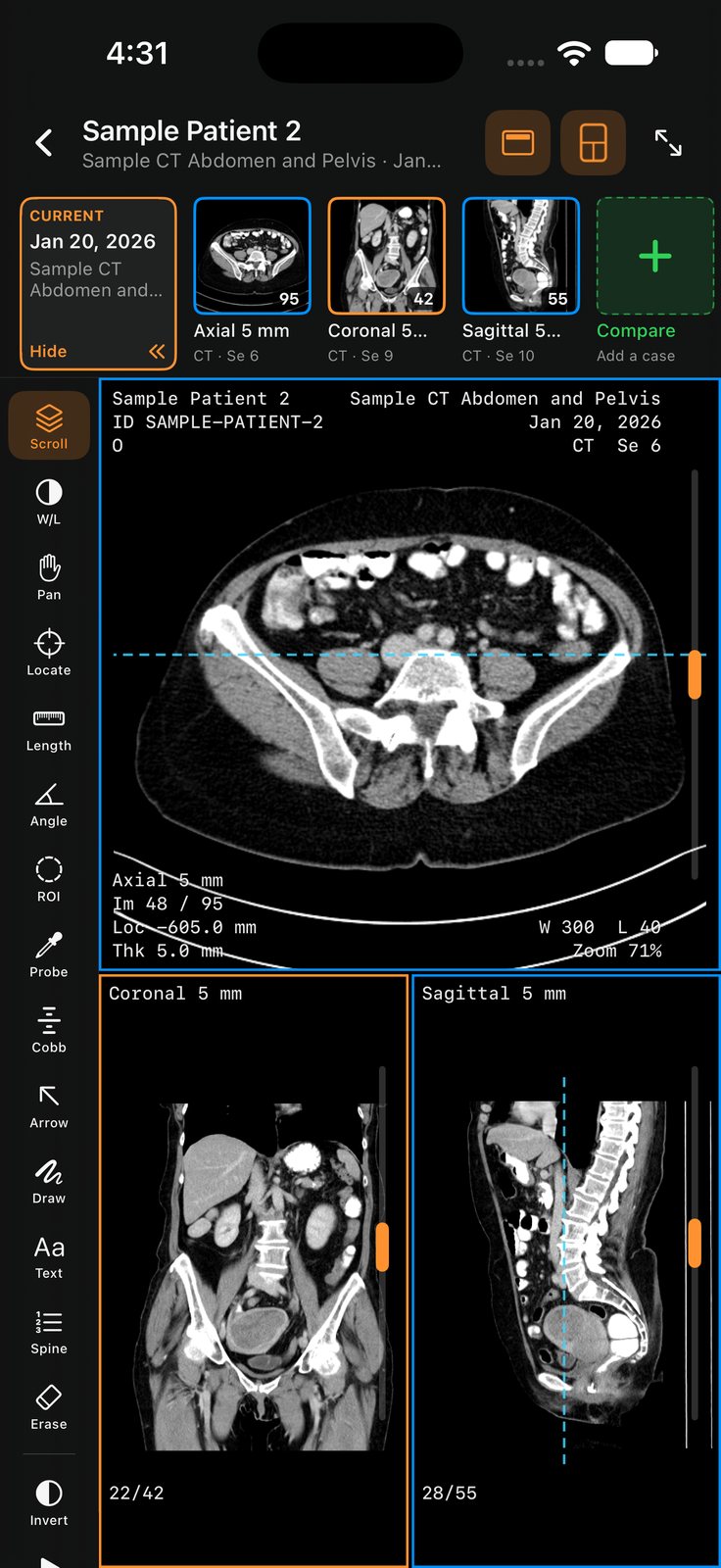
Compare, measure and mark up
Put series side by side and take measurements. These are for communication, not diagnosis.
Back up and sync
Back up and sync, so a study you’ve opened is there when you need it again. Cases with patient info can stay on your device. When you share or back up a case, RadShareAI strips identifiers (best effort).
Works on any iPhone, iPad, Mac or in your browser
RadShareAI works on iPhone, iPad and Mac, and in your browser with the web app. The web app needs an account. You’ll create an account to start. No Duo needed.
Second opinions and insurance review
Second opinions: open the study, mark the area you mean, and share it with the physician you choose. Insurance review: view and share studies with the people involved in a records review.
What stripping identifiers does (best effort)
Cases with patient info can stay on your device. When you share or back up a case, RadShareAI strips identifiers (best effort). Best effort is not a promise of complete removal.
FAQ
Is RadShareAI for diagnosis?
No. RadShareAI is for non-diagnostic imaging purposes only. Not for diagnosis; talk to your doctor.
How do I open a study a patient sends me?
Open the shared link, or import the DICOM files into the app.
What files can I open?
Any DICOM. Share a DICOM from a disk to the app. Upload from any computer on your network, or email it to yourself and share it into the app.
What happens to names and identifiers?
Cases with patient info can stay on your device. When you share or back up a case, RadShareAI strips identifiers (best effort). Best effort is not a promise of complete removal.
Can I compare and measure?
Yes: side-by-side compare and measurements are available. They are for communication, not diagnosis.
How long does a shared link last?
You choose: a shared link expires in 1, 7 or 30 days.
Does it work on the web?
RadShareAI has a web app, alongside the iPhone, iPad and Mac apps. It needs an account.
Do I need an iPhone Duo?
No. RadShareAI works on any iPhone, iPad, Mac or in your browser. It is also especially good on iPhone Duo’s dual-pane layout.
Where do I get RadShareAI?
It isn’t on the App Store yet. The web app is separate and needs an account; you’ll create one to start.
Currently in TestFlight
US only
Outside images, without the disc.
Open the web app today. RadShareAI isn’t on the App Store yet.